How to Actually Use AI (A Simple Framework)
Most people type a sentence into ChatGPT, get generic slop, and blame the AI. The problem isn't the tool. It's how you're talking to it.
I've talked to dozens of friends and customers running businesses who've written off AI entirely. "It's too generic." "It doesn't understand my business." "It takes too long to get what I want."
They're not wrong. Out of the box, AI is generic. But that's not a flaw; it's a feature you can exploit once you understand what's actually happening under the hood.
This post will demystify how AI works, give you a simple framework for talking to it, and show you exactly what to type for any task.
Most people type a sentence into ChatGPT, get generic slop, and blame the AI. The problem isn't the tool. It's how you're talking to it.
I've talked to dozens of friends and customers running businesses who've written off AI entirely. "It's too generic." "It doesn't understand my business." "It takes too long to get what I want."
They're not wrong. Out of the box, AI is generic. But that's not a flaw; it's a feature you can exploit once you understand what's actually happening under the hood.
This post will demystify how AI works, give you a simple framework for talking to it, and show you exactly what to type for any task.
AI Is Just a Text Predictor
Strip away the magic. Large Language Models (LLMs) predict the next based on everything that came before. That's it.
The quick brown fox jumps over the lazy dog.- LLMs don't "think." They calculate the most likely next word
- This is why context matters so much: more context = better predictions
- The same mechanism that makes AI powerful also makes it generic without guidance
How AI Learned to Be Useful
Okay, so AI predicts text. But why does it respond helpfully to questions instead of just... continuing your sentence?
Scientists took these text prediction models and generated millions of training examples where a "helpful assistant" responds to user messages. Companies like Scale AI, Surge AI, and Appen specialize in creating this training data.
How do I bake bread at home without a bread machine? I've always wanted to try...
Model just continues the sentence
Tuning
You are a helpful assistant...
How do I bake bread?
Here's a simple recipe: Mix 3 cups flour...
Model learns to respond helpfully
The model is still predicting text, but now it's been trained on a new format: structured conversations instead of raw sentences. This is called instruction tuning.
Here's the key insight: the assistant's response is entirely dependent on the user's message. Every training example teaches the model "given THIS user message, produce THIS kind of response."
When you give the model a vague message, it falls back on generic patterns from its training data: the average of millions of examples. When you give it specific context, it can produce a specific response.
The Invention Ratio
Here's a rule of thumb: if you give AI a short request and ask for a long response, it has to fill in the gaps with generic patterns from its training data. The less you provide, the more generic the output.
But flip that ratio. Give AI rich context about your situation and ask for a focused response, and it reorganizes and enhances your thoughts instead of falling back on generic advice.
AI is mostly guessing.
Tip: Give more context than you expect as output. AI reorganizes your thoughts. It shouldn't invent them.
- AI doesn't have your context. It fills gaps with patterns it learned from millions of other conversations.
- The less context you give, the more it relies on generic patterns
- Flip the ratio: give more input than you expect as output
- AI is best at reorganizing, summarizing, and structuring information you provide
See the difference context makes:
Write an apology email to a client about a missed deadline.
Write an apology email to a client about a missed deadline.

Context: I'm Alex, a freelance web developer. My client is Sarah Chen at Bloom Marketing. I was supposed to deliver their website redesign last Friday but got sick with the flu. The new site is 90% done and I can finish by Wednesday.
Click to see how context changes AI responses
The RIPE Framework
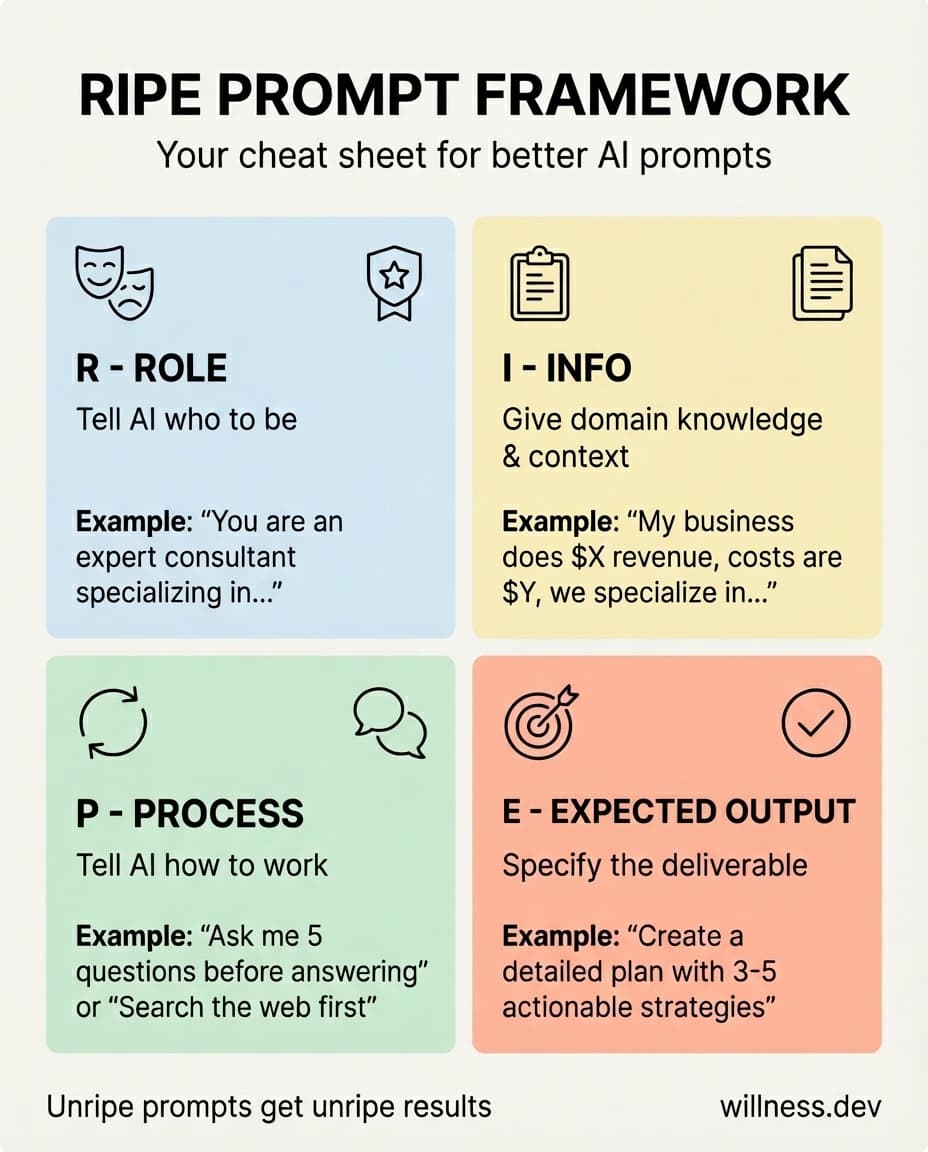
Every good prompt is RIPE. It has four components:
-
Role: Tell AI who to be "You are an expert business consultant specializing in local service businesses"
-
Info: Give AI domain knowledge to work with "My business is a car wash in Denver doing $5k/month revenue with $7k/month costs"
-
Process: Tell AI how to work, or let it collaborate with you
- "Ask me 5 questions one at a time before giving your answer"
- "Search the web for current pricing data"
- "Look at the files I uploaded before responding"
- Or skip this entirely and just have a conversation, then ask for the deliverable when you're ready
When to use which: "Ask me questions first" works best when you're not sure what details matter. Let AI pull them out of you. "Search the web" is for tasks needing current data (pricing, news, trends). "Look at files" is for analyzing documents you've uploaded. And the conversational approach? Perfect when you're brainstorming and don't have a clear deliverable yet.
-
Expected output: Specify the final deliverable "Create a detailed business plan document with 3-5 actionable strategies"
The mnemonic: Your prompt needs to be RIPE. Unripe prompts get unripe results.
Try building one yourself (or use the standalone tool):
Before & After
Let's see the difference. Here's the Bubbly Scrubbly car wash example with an unripe prompt vs. a RIPE prompt.
Write a business plan for my business. We are a car wash in Denver Colorado. We are struggling with getting enough customers. Give me a plan to fix this.
Complete the unripe example first to see the difference...
Click to compare unripe vs RIPE prompts
Notice how:
- The RIPE prompt gets a response that asks questions first
- It's personalized to your specific situation
- You're collaborating with the AI, not just receiving generic advice
When AI Gets It Wrong
Your first response won't always be perfect. That's fine. AI is designed for conversation. Here's how to course-correct:
Be specific about what's wrong Don't just say "try again." Tell it exactly what missed: "That's too generic. Focus specifically on car wash businesses, not general retail."
Add missing context If the response reveals AI was missing information: "I should have mentioned: we only do exterior washes, no interior detailing."
Ask it to change format or tone "Rewrite this as bullet points instead of paragraphs." "Make this less formal. I'm texting this to a friend."
Redirect the approach "Instead of 5 strategies, give me the single highest-impact change I can make this week."
The key: treat AI like a collaborator who needs feedback, not a vending machine that should get it right the first time.
Common Mistakes
Beyond "not enough context," here's what people get wrong:
Asking for output before giving input Don't jump to Expected output without providing Info first. Work with the AI.
Using one chat for too long AI has a limited "context window," the amount of text it can see at once. Once your conversation exceeds this limit, earlier messages get pushed out and AI literally can't see them anymore. It's not being forgetful; that context is gone. One task = one chat keeps things focused and prevents important details from disappearing.
Not exporting context After a long conversation, ask AI to summarize what it learned about you or your project as a downloadable text file. Gold for future chats.
Skipping the Role AI without a role is a master of none. Give it an identity.
Summary
AI is a text predictor trained on structured examples. It's generic by default, not because it's broken, but because you haven't told it how to help you.
Use the RIPE framework (Role, Info, Process, Expected output) to mirror how AI was trained, and give it enough input to avoid the invention ratio trap.
You now understand how LLMs actually work and have a repeatable framework for any task. No more staring at a blank ChatGPT box wondering what to type.
Want more like this? Get my best AI tips in your inbox.

AI DevX Engineer at SurePath AI. Former Amazon engineer. I write about using AI effectively for work.
Recommended Articles
How To Get The Right Length Output From AI
Use read time qualifiers like "make this a 3 minute read" instead of vague words like "concise" or "detailed" to control AI output length.

A Letter to the Developer Who Thinks AI Is a Gimmick
AI is not magic - it's a pattern-matching tool. Understanding how LLMs work explains why your experience sucked and reveals when coding agents actually shine.

AskUserQuestionTool Changed How I Use Claude Code
Stop writing comprehensive prompts. Let Claude Code interview you instead. Here are 7 ways I use AskUserQuestionTool to improve my coding agent's output quality.